QuadCopters – How to get started
I have been watching different videos of QuadCopters recently and I’ve been pretty amused. The way they fly and the way they control their movements is unbelievable – it almost looks like a bug.
If you don’t know what a QuadCopter is, you should definitely have a look at the video below where some advanced features of cooperating Quadcopters are displayed:
So I decided to start reading some more about the materials behind these QuadCopters and how they manage to stabilize in the air.
In this blog post I will try to describe the different steps I have been thru to plan, design and build the prototype of my QuadCopter. There will be coming some more blog posts later on describing how to get the QuadCopter running, programming it, tuning it etc.
This blog post is divided into 3 parts
What is a QuadCopter
In short terms a QuadCopter is what the name says a ‘copter’-like device with four rotors (quad). You might have seen one in action before, as they are being commercialized for police and monitoring use. You can also find them as toys, fx the AR Drone or even universities have been playing with them, developing swarms with them
QuadCopters can be found and built in many different sizes. All from the tiny ones that isn’t much larger than a CD ROM and up to QuadCopters with a motor-to-motor length of more than a meter.

The CrazyFlie
To plan and build a QuadCopter there is a lot of terms you need to understand. So before planning my design I searched the internet for good resources for DIY QuadCopter and found the following links to be the best:
To give you a better understanding of what a QuadCopter contains I will now go thru some of the parts it contains.
Brushless motors
As I said QuadCopters do have 4 motors with a propeller each. Most of the times the so called Brushless Motors are used to drive the propellers.
Brushless motors are a bit similar to normal DC motors in the way that coils and magnets are used to drive the shaft. Though the brushless motors do not have a brush on the shaft which takes care of switching the power direction in the coils, and this is why they are called brushless.
Instead the brushless motors have three coils on the inner (center) of the motor, which is fixed to the mounting. On the outer side it contains a number of magnets mounted to a cylinder that is attached to the rotating shaft. So the coils are fixed which means wires can go directly to them and therefor there is no need for a brush.

Brushless motor internal
The reason why QuadCopters use brushless motors instead of normal DC motors is the much higher speeds and less power usage for the same speed. The brushless motors are more efficient as there is no power lost as there is in the brush-transition on the DC motors.

Brushed motor internal
On this diagram of the brushed motor you will see that it is the coil that is rotating instead of the magnets as on the brushless.
Brushless motors come in many different varieties, where the size and the current consumption differ. When selecting your brushless motor you should take care of the weight, the size, which kind of propeller you are going to use, so everything matches up with the current consumption.
When looking for the brushless motors you should notice the specifications, especially the so called “Kv-rating”. The Kv-rating is an indication on how many RPMs the motor will do if provided with x-number of volts. The RPMs can be calculated in this way: RPM=Kv*U
Propellers
On each of the brushless motors there are mounted a propeller. You might not have noticed this on the pictures, but the 4 propellers are actually not identical. If you have a look at the CrazyFlie picture above you will notice that the front and the back propellers are tilted to the right, while the left and right propellers are tilted to the left.

QuadCopter Plus configuration
This reason for this is that the motor torque of and the law of physics will make the QuadCopter spin around itself if all the propellers were rotating the same way, without any chance of stabilizing it. By making the propeller pairs spin in each direction, but also having opposite tilting, all of them will provide lifting thrust without spinning in the same direction. This makes it possible for the QuadCopter to stabilize the yaw rotation, which is the rotation around itself.
The propellers come in different diameters and pitches (tilting). You would have to decide which one to use according to your frame size, and when that decision is made you should chose your motors according to that.
Some of the standard propeller sizes used for QuadCopters are:
- EPP1045 – 10″ diameter and 4.5″ pitch – this is the most popular one, good for mid-sized quads
- APC 1047 – 10″ diameter and 4.7″ pitch – much similar to the one above
- EPP0845 – 8″ diameter and 4.5″ pitch – regularly used in smaller quads
- EPP1245 – 12″ diameter and 4.5″ pitch – used for larger quads which requires lot of thrust
- EPP0938 – 9″ diameter and 3.8″ pitch – used in smaller quads
In general you should select your propeller according to the following four tips:
- The diameter of the propeller indicates how much air the propeller will be able to “move” while the pitch indicates how much air the propeller moves all the time – not said that you can use this in any way to calculate the air moved.
- The larger diameter and pitch the more thru the propeller can provide. But be-aware that a large pitch makes it much harder for the motor to drive it, it requires much more power, but in the end it will be able to lift more weight.
- When using high RPM motors you should go for the smaller or mid-sized propellers
- When using low RPM motors you should go for the larger propellers as you can run into troubles with the small ones not being able to lift the quad at low speed (RPM)
- A faster rotating propeller (small diameter and small pitch) is used when you have a motor that runs at a high RPM (Kv > 1000) and can provide a decent amount of torque.
- A slower rotating propeller (longer or larger pitch) is used when you have a motor that manages fewer revolutions but can provide more torque.
Roll, Pitch and Yaw
For this matter let’s just sum up what Roll, Pitch and Yaw is, as we are going to use these terms much more.
Roll, Pitch and Yaw is some well used terms from the aircraft terminology. The terms are used to describe the objects orientation around each of its axis. Have a look at the picture below and I think you will understand the terms.

ESC – Electronic Speed Controller
As the brushless motors are multi-phased, normally 3 phases, you can’t just apply power to it to make it spin. The motors requires some special phase-control electronics that is capable of generating three high frequency signals with different but controllable phases, but the electronics should also be able to source a lot of current as the motors can be very “power-hungry”.

Turnigy Plush 18A ESC
In this case we got the Electronic Speed Controllers, known as ESC’s. The ESCs is simply a brushless motor controller board with battery input and a three phase output for the motors. For the control it is usually just a simple PPM signal (similar to PWM) that ranges from 1ms (min speed=turn off) to 2ms (max speed) in pulse width. The frequency of the signals does also vary a lot from controller to controller, but for a QuadCopter it is recommended to get a controller that supports at least 200Hz or even better 300Hz PPM signal, as it should be possible to change the motor speeds very quickly to adjust the QuadCopter to the stable position. It is also possible to get ESCs that is controlled thru OneWire of I2C. These tends to be much more expensive though, but sometimes it is also possible to “mod” other ESCs to add the I2C feature.

Turnigy Plush ESC Electronics
ESCs can be found in many different variants, where the source current is the most important factor. You should always chose an ESC with about 10A or more in sourcing current as what your motor will require.
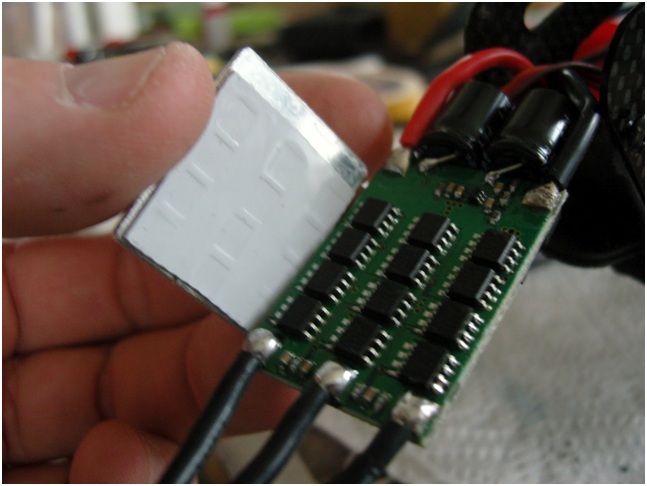
ESC High Power FETs
Another important factor is its’ programming facilities, as some ESCs support range programming while others do not. This means that with some ESCs you don’t necessarily have to use the “1ms to 2ms” range, but you can adjust it to your own needs – this is especially useful when we are going to make our own controller board.
Battery
All this leads to the battery, the power source for the whole device. For the battery two types can be used, whereof one of them is highly recommended. The NiMH and the LiPo. I won’t say much about the NiMH as most communities tells us to stay away from these for driving QuadCopters as they first and foremost are not able to provide enough current and secondly they weight a lot more than LiPo batteries when they have the necessary current ratings.
Instead we should talk about LiPo batteries, but in this world there are also a lot of different variants of these too. LiPo batteries can be found in packs of everything from a single cell (3.7V) to over 10 cells (37V). The cells are usually connected in series, making the voltage higher but giving the same amount of amp-hours.
For a QuadCopter you should go after the 3SP1 batteries which means 3 cells connected in series as 1 parallel (just forget the parallel, as it has no sense because we just use 3 cells in series). This should give us 11.1V but at fully charged it actually gives us around 12V instead.
For a brushless motor with a Kv-rating of 1000, this gives us a maximum of 12000 rounds per minute. This number is totally fictive as the battery voltage will drop immediately to around 11.1V (at fully charged state) when current is being drained. Anyways, this gives us a good idea about how fast the propellers will be spinning!

ZIPPY Flightmax Battery, 4000mAh 25C
As for the battery capacity regards you should make some calculations on how much power your motors will draw and then decide how long flight time you want and how much influence the battery weight should have on the total weight. A good rule of thumb is that you with four EPP1045 propellers and four Kv=1000 rated motor will get the number of minutes of full throttle flight time as the same number of amp-hours in your battery capacity. This means that if you have a 4000mAh battery, you will get around 4 minutes of full throttle flight time – though with a 1KG total weight you will get around 16 minutes of hover.
Another thing to be-aware of when selecting the right battery is the discharge rate, formerly known as the C-value. The C-value together with the battery capacity indicates how much current you are able to source from the battery. The calculations follow this simple rule: MaxSource = DischargeRate x Capacity
Take the Zippy4000 from the image above, which has a discharge rate of 20C and a capacity of 4000mAh. With this battery you will be able to source a maximum of 20Cx4000mAh = 80A. So in this case you should make sure that the total amount of current drawn by your motors (ESCs) won’t exceed 80A.
To make some more detailed calculations about your specific design I recommend you to visit the free xcopterCalc – Calculator for Multicopters. I will tell more about this in the “Initial decisions” section.
The frame
Every part in a QuadCopter design works together and the frame is the one joining all of them. The frame can be designed in many ways with many different kinds of materials. The important things are to make it rigid and to minimize the vibrations coming from the motors.
A QuadCopter frame consists of two to three parts which don’t necessarily have to be of the same material:
- The center part where the electronics and sensors are mounted
- Four arms mounted to the center part
- Four motor brackets connecting the motors to the arms
There are three kinds of materials that I recommend using for a QuadCopter frame:
- Carbon Fiber
- Aluminium
- Plywood or MDF
Carbon fiber is the most rigid and vibration absorbant of the three materials but is also by far the most expensive.

Most of the times the arms used in QuadCopters are made of hollow aluminium square rails which makes the QuadCopter relatively light weight but still makes it rigid. The problem with these hollow aluminium rails are the vibrations, as they aren’t damped and will therefor vibrate to the center part and maybe mess up the sensor readings.

Instead solid MDF plates could be cut out for the arms as they will absorb the vibrations much better than the aluminium. Unfortunately we have another problem then, as the MDF plates are not very rigid and will break if the QuadCopter falls to the ground.
As for the center part everything from carbon fiber, aluminium or plywood can be used. Plywood is commonly seen as the center part because it is light weight, easy to work with and is reliable and rigid so it can hold the four arms together as required.
The arm length varies a lot from QuadCopter to QuadCopter as it is up to the individual to decide how big he would like his quad to be. In the QuadCopter terminology we use the abbreviation “motor-to-motor distance” to explain the distance for the center of one motor to the center of another motor of the same arm (or in the same direction).

The motor to motor distance decision goes hand in hand with the propeller diameter decision, as you should definitely make enough space between the propellers. Usual QuadCopters with EPP1045 propellers, which means a propeller diameter of 10″, has a motor to motor distance of around 60 cm ~ 24″, though it will be possible to make it less. Others with smaller propellers, fx with a diameter of 8″ or less, will be able to have a motor to motor distance of around 12″.
Frame configuration
Another decision to make is in which configuration you would like to fly your QuadCopter – here I think about in which way front is.
We have two types of frame configurations, the X and the +. The X configuration looks like this:

QuadCopter X configuration
While the + configuration looks like this:
QuadCopter Plus configuration
The difference is how the motors have to be controlled. For the + configuration the motor controlling is fairly simple as you just have one motor assigned to each direction. The negative aspect of the + configuration though is that you only have a single motor to provide extra thrust (speed up) when you want to move to another direction. In the X configuration you will always have two motors working together on changing direction.
IMU – Inertial Measurement Unit
Wow, I think this post is getting really big, and I haven’t even talked about the fun part yet – the IMU.
The Inertial Measurement Unit is the sensor system of the QuadCopter. The main purpose of the Inertial Measurement Unit is to calculate the orientation of the quad – the three orientation angles, Roll, Pitch and Yaw. These angles are then fed into some controlling electronics that uses those angles to calculate the required changes in the motor speeds.
The IMU consists of at least 6 sensors, also known as 6DOF. These sensors should be a 3-axis accelerometer and a 3-axis gyroscope. Sometimes another sensor, a 3-axis magnetometer, is added for better Yaw stability.

Sparkfun 9DOF Stick
The accelerometers measures acceleration as the name indicates. Now you would think, “Why the heck do we need to measure acceleration to know the orientation?”, but yet again there is another law of physics – the gravity. The gravity is actually a downwards acceleration towards the center of earth, which to all objects makes a downward force keeping the objects on the surface. The accelerometer is actually measuring force, so the downwards gravity acceleration will also be measured by the accelerometer.
As the accelerometer sensor can measure the acceleration in three directions we can actually calculate how the accelerometer is oriented against the surface.

Sparkfun 9DOF Stick
Fx when the accelerometer is held as the image above, the X axis will show positive 1g, while all the other two axis will show 0g.
Now the next question rises, “Why isn’t the accelerometer then enough to measure the orientation?”. The problem lies in the way the accelerometer works, because it isn’t very stable. If only the accelerometer were used to calculate the orientation even the smallest movements of the accelerometer will mess up the orientation. So if mounted on a QuadCopter with vibrating motors it will be no good.
Instead we use a gyroscope to address this problem. A gyroscope measure angular velocity, in other words the rotational speed around the three axis. The output of a gyroscope is given in radians per second or degrees per second. With both the accelerometer and gyroscope readings we are now able to distinguish between movement/vibration going up, down, left or right or rotation of the sensor, which is what we would like to know.
Final question, “Then why didn’t we just use the gyroscope when it can tell us the rotational movement?”. Yet again the problem lies in how the sensor works. The gyroscope tends to drift a lot, which means that if you start rotating the sensor, the gyroscope will output the angular velocity, but when you stop it doesn’t necessarily go back to 0 deg/s. If you then just used the gyroscope readings you will get an orientation that continues to move slowly (drifts) even when you stopped rotating the sensor.
This is why both sensors has to be used together to calculate a good and useful orientation.
For the Yaw rotational movement the accelerometer can’t be used as the reference sensor as it could with the Roll and Pitch movement. Instead a magnetometer is sometimes used. A 3-axis magnetometer measures the magnetic field that affects the sensor in all three directions. As the earth contains a magnetic field on the North- and South Pole, the magnetic sensor can be used to determine where north and south is located. The locations of these poles can then be used as a reference together with the angular velocity around Yaw from the gyroscope, to calculate a stable Yaw angle.
I won’t go more into details on how these calculations are done in this post. I will write another post soon with more details on these algorithms.
The 3 different sensors usually come in QFN or BGA packages which make it hard to do your own development with them. Instead people usually buy an IMU sensor board with 6DOF or 9DOF or even buy a complete IMU unit with processor and sensors.
Here is a list of some of the commercial available IMU sensors boards and units.
IMU sensor boards:
IMU units:
The raw sensor boards I’ve seen in use works either digitally by I2C or by analog. I prefer to use the digital boards as I2C is so easy and fast. Though if you got a fast processor with some good analog inputs capable of sampling fast enough, the analog boards seems to be more inexpensive than the digital ones.
The difference between the IMU sensors boards and the IMU units is that the IMU units contain a microprocessor. Usually it’s a small 8-bit microprocessor which will do the calculation of Pitch, Roll and Yaw by the use of some kind of algorithm. The calculated data will then be put out on a serial bus or sometimes also available by I2C or SPI.
The choice of IMU is going to reflect which kind of controller board you are going to use. So before rushing out buying one of these boards you should read the next section about the controller boards, as some of them do already contain the different sensors.
Controlling electronics
QuadCopters can be programmed and controlled in many different ways but the most common ones are by RC transmitter in either Rate (acrobatic) or Stable mode. You can either buy an already commercial available controller board or build one yourself. Someone is also doing a mixup by buying some of the parts, like an Arduino and the sensors but then they make the shield and some of the software themselves.
Here is a list of some of the commercial available controller boards that I have met on my way thru the QuadCopter jungle.
Some of the controller boards already contain the required sensors while other requires you to buy these on a separate board.

The AeroQuad MEGA Shield
The AeroQuad board is fx a shield for the Arduino, either the Arduino UNO or the Arduino MEGA. The AeroQuad board requires the Sparkfun 9DOF stick which is soldered to the shield.
The ArduPilot board contains an ATMEGA328, the same as on the Arduino UNO. Like the AeroQuad shield this board doesn’t contain any sensors either. You would have to buy fx the ArduIMU and connect it to the board to use it.
The OpenPilot is a more advanced board which contains a 72MHz ARM Cortex-M3 processor, the STM32. The board also includes a 3-axis accelerometer and 3-axis gyroscope. Together with the board comes a great piece of software for the PC to calibrate, tune and especially set waypoints for your QuadCopter if you have installed a GPS module – which I will be talking more about in the next section.

OpenPilot ARM Cortex-M3 board
As I said earlier QuadCopters are usually controlled in either Rate (acrobatic) or Stable mode. The difference is the way the controller board interprets the orientational feedback together with your RC transmitter joysticks.
In Rate mode only the Gyroscope values are used to control the QuadCopter. The joysticks on your RC transmitter are then used to set the desired rotation rate of the 3 different axes. In this mode you can control your QuadCopters speed of rotation around the 3 axis, though if you release the joysticks it doesn’t automatically re-balance. This is useful when doing acrobatics with your QuadCopter as you can tilt it a bit to the right, release your joysticks, and then your QuadCopter will keep that set position.
For the beginner the Rate mode is a bit hard to start with so instead you should start with the Stable mode. In the Stable mode all the sensors are used to determine the QuadCopters orientation in the air. This orientation is then used to calculate the speed of the 4 rotors to keep the QuadCopter balanced, being plan with the surface. The joysticks on your RC transmitter are then used to set the desired angle for the different axes. So if you would like to move your QuadCopter forward a bit you should simply tilt one of the joysticks so the desired Pitch angle will be changed. When releasing the joysticks the angle will be reset and the QuadCopter will be stable again.
Extended options
Other options such as GPS, Ultrasonic sensor, Barometric pressure sensor etc. can be used to add even more orientational features to the QuadCopter.
A GPS unit can fx be used to measure speed and use that in the calculation of the movement. It is especially also usefull if you would like to make your own UAV (Unmanned aerial vehicle), which needs to know its’ exact position.
An Ultrasonic sensor can be mounted on the bottom of the QuadCopter to measure the distance to ground. This is usefull if you would like to make a quad that should be stable in the height without having you to adjust the motor thrust all the time.
A Barometric pressure sensor can be used for the same purpose, though the Barometric pressure sensor works best when you get up high, as the pressure doesn’t differ a lot when close to ground.
The best altitude combination will be to use both an Ultrasonic sensor and a Barometric pressure sensor at the same time.
Initial decisions
I hope the walkthrough of the different parts gave you an idea of which parts you should be looking for and how big you would like to make your quad. Now it is up to you to select the right parts for your QuadCopter and this is not an easy task. To help you with this I’ve made this 1-2-3 list to get you started.
To find the different materials like motors, ESCs, batteries etc. I recommend you to visit HobbyKing, a very good, popular and inexpensive RC webshop in China. www.hobbyking.com
- Motor to motor distance: Decide which size of QuadCopter you would like to built.
- Propeller size: Decide your propeller size and pitch. The size should reflect your motor to motor distance choice.
- Motor selection: By looking at fx HobbyKing and our description find the appropriate motors for your QuadCopter.
- ESC and Battery selection: By looking at the selected motors you should be able to select the proper ESCs. The battery capacity is decided on the basis of how long flight time you would like, but have the weight in mind.
- Theoretical Confirmation: Check and confirm that your QuadCopter will be able to fly with your selected parts. Please see the next section about the Theoretical calculator.
Theoretical calculator
To ease the confirmation process where you would have to calculate the thrust from each motor and use the total weight to see if your QuadCopter were able to lift off and hover, Markus Mueller have made a very easy to use online calculator for this exact purpose.
The calculator is called “xcopterCalc – Calculator for Multicopters” and can be used to calculate many different parameters of your QuadCopter. The great thing about the calculator is all of the already prefilled information of different motors, ESCs, batteries etc. This really speeds up the process.
Here I have attached a screenshot of the calculations done on the behalf of my QuadCopter project.

Our design parameters in the xcopterCalc
From this calculator we can see that we will be able to hover with the QuadCopter for around 12 minutes when the battery is normally charged. If our decisions were wrong and something would not work well as supposed to the calculator will tell us that too. Fx let us increase our QuadCopter weight from 1500 grams to 2500 grams.

To heavy = throttle problems
Then you will see that it tells us that we won’t be able to maneuver the QuadCopter that well because the required throttle for hovering is at 94% of the total throttle. The calculator will also check that the selected battery is able to deliver enough current for all the motors at full speed.
I really find this calculator very nice and easy to use, and if you like the calculator as much as I do I recommend you to donate a couple of dollars to Markus Mueller.
Conclusion
The last step for you is now to buy all the required materials, electronics etc. which definitely can be an expensive affair. But if you are excited to build your own QuadCopter from scratch it is definitely going to be a fun and instructive project, which might end up taking a lot of time – but hey! isn’t that what projects are for -> to be developed.
When you have completed the assembly of your QuadCopter you might want to take a look at the “How to Fly a Quadcopter ? The Ultimate Guide” by UAVCoach to avoid making the begginer mistakes and collisions. There guide provides a great ressource for initial flight planning and tutorials on how to get comfortable with flying a QuadCopter without crashing. The guide
Please do not hesitate writing a comment or giving us some feedback on this article. We hope you learnt something by reading all this, and hopefully you will soon have made your own QuadCopter.
It’s the best guide on Quadcopters I have ever seen.
I have been doing R&D on multirotors for quite sometime but this is the only place where I found all required information in such a comprehensive manner.
@Kashif
Thank you. Glad to know that it can be used.
If you have any questions regarding your research and design process you are welcome to ask.
Thank you so much this is by far the most info i’ve found in the last couple of days searching.
hello, this is the best explanation on quadcopter i’ve seen….
Hi i am Ralph Reiter , i am an electronic engineer and for about 3 years i am playing with
microcontrollers and microelectronics , specially data acquisition with delta sigma ADCs and
arm cortex controllers.A friend of me wants to build a quadcopter and i have 3 STM32f4Discovery boards, so i looked on Goggle to find a quadcopter project based on ARM Cortex M4.
I found your Youtube Video and am very interested, also i found your Source Code on Github compiled with Atollic True Studio, i downloaded it and tried to compile it.
But in this code there seem to be some errors in the source files rc_receiver.c
and ultrasonic sensors.c (some variables seem to have not been declared.)
Also it would be nice to provide some additional information about the electronics(schematics) especially the connection between the rc receiver and the ARM Cortex M4
As i think the RC receiver puts a PWM signal out in which there are every RC Channels encoded.(Summing of all the channels). We think to build up our project based on yours and can contribute in the futur to some additional experience and information.
Good work and many thanks in advance!!!
sir,
Thanks a lot for providing me legible information.for desining(http://blog.tkjelectronics.dk/wp-content/uploads/CrazyFlie-400×267.jpg) please lend me the step by step procedure for desininig the frame in the above link—using pc board)..
I am awaiting for u r reply.
@lokeshraj
Hi.
We haven’t made that small QuadCopter shown in the image. It is the so called CrazyFlie
Please have a look at their homepage for more information about that project, which hopefully will be released as open source soon.
Regards Thomas
Hi i’m wasakorn
i’m a third year computer engineer at japan i’m working on UAV plane i have i problem about coding interact with interface it would be your very kindness
i can’t find your source code please tell me how or sent me your source code on my e-mail address
thank you so so much
@Ralph Reiter
Dear Ralph.
The code you have found on our Github is only partly working, as not everything has been implemented yet. The reason why you got some troubles compiling might be with the recent push to Github.
I have just pushed the latest version, so please pull this and try again.
The problem might also be found in the version of Atollic TrueStudio that you are using. I am using the free STM32 Lite version 2.3.0, which is unfortunately outdated but working fine.
It is correct that the RC Receiver is outputting individual PWM signals, but the great thing about these are that they are all phase seperated. This means that it was possible for me to put all of the signals together in one by using some OR gates.
The schematic for this is pretty simple:
Do not hesitate asking any further questions.
Regards Thomas
sir iam jeevan from india.i have designed one quadcopter using hk control board.now i have to attend a competition with the following restrictions regarding my quadcopter.the restrictions are
1)mainly regarding size of quad.the total quadcopter should fit in a box of 30cm diameter.
2)my quad should travel a distance of 1.5 km with live feedback and return to its initial place without change of battery.i.e.,it should travel a total distance of 3km without change of battery.
3)live audio and video feedback and with maxmum flight time.
please help me …………………
@sai jeevan reddy
Hi Jeevan.
Well that project is a big task if you just go from using the HK Control board to do this.
For this task you would need an advanced UAV controlling system with GPS and other tracking features. I would recommend you the ROFL platform.
Regarding the live audio and video feedback it is called FPV (first person view). For this you would need some a camera, an OSD (on screen display) box, a video link and of course a pair of video googles for the viewing. Fx this one: FatShark 2.4Ghz Telemetry System (Incl. Tx/Rx)
Good luck with your project.
Best Regards
Thomas Jespersen
sir what about the power system.ie.,motor,esc’c,battery?????
sir plz help me out to make my model much small with max. flight time………….
@sai jeevan reddy
Dear Jeevan.
Well for such a system there are many other factors which play a big part of the decision.
I just can’t tell you which parts to use. That would require a great research.
If you are interested in having us to work for you with this project we will be happy to do this research, find the appropriate parts, design the project and even also program the project if necessary. Though this will require many hours so it will cost some money for the freelance work.
Please let me know your decision.
Regards Thomas
sir actually iam panning to use this onehttps://store.diydrones.com/APM_2_0_Kit_p/br-ardupilotmega-03.htm as control board.
sir i ask u to do research on this i.e., only on the power system and size of quadcopter.
i still dont get why we have to use expensive brush less motors with ESC….is this just so that we can control the speed of the motor easily…
cant i just use this motor instead…
http://robokits.co.in/shop/index.php?main_page=product_info&cPath=2&products_id=208
it is a normal dc motor and it gives a 25000 rpm and i can control its speed to whatever rpm i want….and it just 6$…
it will significantly reduce cost…
@sahil
You don’t have to either. Many smaller Quadcopters use Brushed DC motors as they are smaller and doesn’t require the same ESC controller as the Brushless do.
The only main concern are the durability, efficiency and maintance.
thank you
I stumbled across this after a few days of trying to research building my own quad, and it is the most helpful page I’ve seen yet. Thanks very much for the info!
Dear Thomas,
i don’t quite understand the interrupt routine to read the RC receiver channels.
in the code i didn’t find the function to initiate the timers (RC_Init wasn’t called)
i put it in the main and now my interrupt routine for TIM4 is executed.
What i don’t understand is the line
if (IC3ReadValues[1]<4………………………..(to check if package is valid)
What kind of RC Receiver are you using, as i understand is the RC sum receiver signal connected to PD12 (AF TIM4 Ch1) ?
Take care that you use also PD12 for the LED on the STM32 Board.Doesn't it interfere with this.
Thank you in advance for the help
Best regards
Ralph Reiter
E-mail: rareiter68@gmail.com
@Ralph REITER
Dear Ralph.
Great to see that somebody is watching our GitHub. You noticed the place where the code haven’t been finished yet.
The RC Receiver implementation was tested in another (not uploaded) project, which is why it hasn’t been fully merged with the main project
The channel outputs are OR’d together as shown in this image:

The OR’d output then looks like this:

The reason for the IC3ReadValues[1]<4 and so on is to make sure that the spaces (the off times) are less than 2us, to confirm that the receiving packet alignment is correct.
I have measured the output spaces to be around 0,5us to 1us, but I gave it some space up to 2us.
And no, the LED doesn't interfear - I have tested it.
Best Regards
Thomas Jespersen
The weight of the motor is significantly greater than brushless. When considering motor, RPM is not the only parameter. You should consider its wattage=RPM*Torque
So at 25K rpm there is no load. When loaded rpm will reduce drastically.
@sahil
What about thrust calculation (rpm and pitch ,diameter propeller).how much thrust require to lift how much of weight…power requirement..what about air resistance to propeller iits effect on motor perfoemance.what should be then tourque
@Thomas Jespersen
Dear Thomas,
could you please tell me which Rc receiver you are using, because on all the rc receivers of my friend the servo signal outputs are not all phase separatet,some channels are simultaneous, we observed this on a scope.
I build an Or Gate circuit with the HCF4071 circuit.
Thank you.
@Ralph REITER
Hi Ralph.
I am using the Fly Sky FS-TH9X which came with the following 8ch receiver: FlySky 2.4G 8 CHANNEL RECEIVER
I guess that the phasing can be different from receiver to receiver, so that I might just have been lucky with my receiver outputs being all phased apart.
Great blog!
I have been brainstorming since weeks.
Your blog is one of the finest of all. It contains comprehensive and necessary details of each and every component.
I’m so going to follow your blog.
Please keep posting your progress.
Thanks Jespersen!
@Tamoor Haider
Thank you for the kind words Tamoor. I appreciate it.
Regards Thomas
Dear Thomas
I have modified the RC Receiver file so that it now works with my friends Rc receiver,
i have now the question how you have integrated the RC parameters (aileron, rudder,elevation)
in the PID Regulator, this part seems to be missing in the code on your Github page ?
We tried to add these variables to the ESC’s with the correct scaling sou that they override the PID regulator, but this is not sou good as probably this destabilizes the Regulator.
For the PID parameters we gave it a Kp (Proportional part) and a Kd(D part), the D part makes it more stable but we still got oscillations.
If you are interested in our PCB design, i will next week place an order for a professionnel PCB
and i can send you also a PCB.
Thank you in advance
very nice explanation…..very useful to those who are trying to do this
excellent blog with goood information
Hi sir,
I was planning to order 2 Turnigy 2200mAh 3S 30C Lipo Packs, http://www.hobbyking.com/hobbyking/store/__9394__Turnigy_2200mAh_3S_30C_Lipo_Pack.html
What kind of travel charger do you think I should be looking at?
@Ralph REITER
Dear Ralph.
Which kind of board are you making? Using the STM32F4 but then which sensors?
Regarding the RC parameters we add them to the motor speed together with the PID regulator values.
The routine that sets the different motor speeds can be found as the PID_Task() in the PID.c file. The motor configuration for this code is +
An example line from the PID_Task() where the Right motor speed is set (line 54) is:
ESC_Motor_Values[ESC_RIGHT] = ESC_THROTTLE_MIN + Throttle – PID_RollVar.Control + PID_YawVar.Control;
Regards Thomas
@Bhargava Venkatesh
Well I don’t know about travel charger (size, weight etc.) but I would recommend the Turnigy Accucel-6 together with a small 12V, 3A wall wart power supply.
Regards Thomas
Amazing write up, thank you so much 😀 !
What is the purpose of using ardupilot? How does it work? What is the input and output?What are the additional components or circuits necessary to use an ardupilot?
what is the estimated cost of quadcopter project in india and is it necessary to use only one kind of arduino processor uno or we can use others also ?
@maria
Hi Maria.
Please have a look at the ArduPilot homepage where you can find much more information about the board.
In short the board a microprocessor compatible with the Arduino IDE. The new and active ones, such as the ArduPilot MEGA contains an ATMEGA1280 and together with the required sensors such as 3-axis Gyro, 3-axis Accelerometer and Barometer it can be used as the IMU part.
But the great thing with the ArduPilot is also the Receiver inputs together with Motor PWM (ESC) outputs.
The ArduPilot can not only be used to Quadcopters but to all sorts of Unmanned aerial vehicles such as Multicopters in general, planes, helicopters and even also some ground vehicles is necessary.
To make the ArduPilot really unmanned an external GPS is connected and with it’s automatic takeoff feature too you got yourself a UAV.
Regards Thomas
@aniket
It is difficult to estimate the costs of a Quadcopter as it all comes down to which elements you chose to use. But you might be able to make a cheap and working Quadcopter for around than $250 including frame, IMU, motors and transmitter/receiver pair.
awwwwwsme info thank u sooo much:)
Hi, I just read your post and i can’t find software for STM32F4 Discovery. So can you help me and give me download link that i can produce quadcopter?
@lazarvgd
When I made this article and started my Quadcopter project I was using the Atollic TrueStudio IDE for the development of the code to the STM32F4 Discovery board.
But as this has now been even more commercialized and limited I decided to switch to the free CooCox CoIDE software.
When you have installed this software you could try importing the code I’ve made, though this is not finished and ready for a Quadcopter yet!
That code can be found here: https://github.com/TKJElectronics/QuadCopter_STM32F4
Thomas.
That’s a lot of useful information. Thanks for that.
Do you have any source of information on DIY ESC’s? I’m leading a project for my engineering design course, and it would be just great we could design and build them.
Right now we are in the research phase, and I’m wondering about brushed or brushless. The ESC could be a decision factor as I would ask my students not to use a commercial one. On the other hand, I’ve just asked for some brushed (Heli-Max 9582) and they cost about $25 USD, that’s insane compared with the $7 USD for some 1200 Kv brushless.
So, if you happen to have any info on ESCs that would be very appreciated.
Thanks again for all the effort you have put in this post. Hope to hear you soon.
@sahil
Sahil. Did you succed with those 25000 dc motors?
@RAM
We have been looking for an ESC reference design for a while too but haven’t found a lot either.
Though we managed to find the schematic for the well known TowerPro ESC family, such as TowerPro 18A or TowerPro 25A.
You can download these schematics we found here:
TowerPro 18A
TowerPro 25A
As a side note we also found the schematic for the HobbyKing 30A BlueSeries, though the schematic is a bit messed: HobbyKing 30A BlueSeries
Thomas,
Thanks for the quick response. I have looked at the diagrams and they seem quite interesting.
I was reading again the ESC part of your post. You are talking about the PPM signal but I don’t think the motors can actually use a PPM signal as they need something close to a sine wave. Being that I assume you’re talkinkg about the ESC receiving the PPM signal (instead of a PWM as in a servo motor) from the main control device .
Or I am misundestanding and the PPM signal can drive the motor…?
This may sound so basic for a question, but I’ve just learnt about PPM half an hour ago 🙂
Hi Thomas,
It’s a really nice explanation.
I have a little bit complex problem. I would like to build some experimental autonomous quacopter, or maybe octocopter. Problem is that I have no experience. And now to my problem. I checked controllers you mentioned in this article, specially i liked ROFL. I would like to write more complex part of code in some higher language (for example C#). So I’am thimking about some harware which contains some kind of dll which provides functionality to read sensors (accelerometer, gps, etc.) and enable’s me to give command to rotors (ESC). Then I would like to call this dll functions from higher level programming language (C#). So my question is, if you know about some hardware (controller) to use, or to combine mentioned controller (for example ROFL) with some embedded pc (it’s enought to have some way to connect controller with desktop, or notebook for testing).
If you have any advice for me it would be great.
With regards
Tibor
thank u THOMAS
Bt then i still got doubts
http://www.rhydolabz.com/index.php?main_page=product_info&products_id=572
this is the site from wer i am planning to buy the ardupilot ..it says we need to attach a XY and Z sensor to operate it . what is this sensor. theres no information regarding this .
and with the ardupilot on board do we need another arduino ??
from what i understood….from the ardupilot we get constant GPS outputs as the quadrotor moves and we program the arduino using these outputs to stabilize the rotor ?? is it ?
or without the arduino can we program the ardupilot for autopilot and also to control it manually using xbee transmission.
@RAM
The PPM signal I was talking about is a method that some RC trasmitters/receivers use for the output. A PPM signal can’t be connected directly to all kinds of motor controllers, especially not those that require a correct PWM signal going from 0% to 100% duty cycle.
As the PPM signal makes a pulse where the width defines the set point, but then has a predefined delay, it isn’t completely the same as PWM.
Another thing is that it is possible to combine output channels on one single PPM line by placing the output pulses from each channel after each other in the timeline.
In your case though you shouldn’t worry too much about this. As long as you are able to output a Servo similar PWM signal you should be good to go.
I hope this answers you question 🙂
@maria
The ArduPilot on the shop link you wrote is the old version which doesn’t have the sensors onboard, why you have to buy them seperately and connect them to the board.
Though it is correct that you with the ArduPilot can connect a GPS so you can make the Quadcopter do a position hold or even coordinate a route for it to fly. The GPS isn’t used for stabilization as this is the sensors job (gyros and accelerometers)
Instead of the old “discontinued” model, you should have a look at some of the newer ones. This will also give you an idea of the price of a complete ArduPilot controlling system.
https://store.diydrones.com/category_s/1.htm
Regards Thomas
With the ardupilot on board do we need another arduino ??
from what i understoodâ?¦.from the ardupilot we get constant GPS outputs as the quadrotor moves and we program the arduino using these outputs to stabilize the rotor ?? is it ?
or without the arduino can we program the ardupilot for autopilot and also to control it manually using xbee transmission.
my doubt was whether we need an ardupilot and another arduino for stabilization????
@maria
No you won’t need an extra Arduino. The Ardupilot is the “Arduino” in the system.
You will just need the sensors (IMU), GPS, RC receiver module, ESC and motors to complete a multirotor setup.
But we are gonna use a xbee for wireless transmission and reception then rc receiver modules is required ? We want to use a joystick for its control and also xbee so don’t we need an arduino for programming…. That is the ardupilot will give us pitch roll and jaw values which is taken as input to the arduino to make a stable system? Arduino alone can be used just for auto pilot mode right? With just ardupilot we cannot manually control the movements of quadcopter right?
Just found your site a few days ago… the STM32F4 review… lots of great info here on a great variety of things… very impressive. I’ve been fooling with arduino and quad copters for well over a year now. The original KK controller and also a multiwii controller with the wii motion control plus. Its a pretty fast moving area of development. There is a 32 bit variant of the multiwii software that could use someone with your talents, Though its it appears you are well on your way to rolling your own.
It can be found at http://www.multiwii.com/forum/viewtopic.php?f=22&t=2387
The hardware is here http://abusemark.com/store/index.php?main_page=product_info&cPath=1&products_id=30
Keep up the good work.
@maria
Ok I see. If you are going to use Xbee for the controlling of the Quadcopter an RC receiver module will not be required.
The Ardupilot board is an Arduino, hence the name. So you would simply have to connect the Xbee module to the Ardupilot together with the IMU sensors (accelerometer, gyro and magnetometer) and then you should be able to program the Ardupilot thru Arduino IDE to receive your serial control commands (thru the Xbee module).
With Ardupilot you will be able to control the Quadcopter manually. Though by default it supports and use an RC receiver module – but it should be easy for you to change this to your own Xbee module serial protocol.
But is it necessary ot use an arupilot…. ? instead an arduino board can be used rite along with IMU and xbee for a quad copter..?
@maria
No, it is not necessary to use the Ardupilo. Of course you can just buy an Arduino board, connect it to your IMU using I2C or SPI and then connect it to your XBee module for wireless control/communication.
The smart thing about Ardupilot is that everything is put together on the same board (when buying the most recent version) making it smaller and easier to get started.
@yawstick
Dear Yawstick.
Thank you for the links. I am well aware of the Naze32 and have been trying slightly changed version of it myself on the FreeFlight board.
My intentions were to make my own customized project for my needs, but I guess I will use some inspiration and source parts of other projects too.
I haven’t found the source code for the Naze32 project yet, but now you got me the link so thank you for that.
I will let you all know how it goes with the development.
Regards Thomas
As I am using that website for just calculation, I want to know that how they calculate that?
Can you help me figure it out?
@john
Yeah, it is indeed a nice page.
The calculations though is a bit more difficult than that, and it will be hard for me to explain.
It both includes physical math about force vectors and torque, and especially also a big part of electrical science math as resistance and load current.
Instead of looking up how to do all the math I think you should appreciate that this work has already been done for you by Solutions for All and maybe think about donating a bit to them as a thanks.
a.o.a hy i need a gayro plzz help me from pakistan
Hey there, this is an excellent guide! I stumbled upon your blog when I was taking a look at where visitors to our website were coming from, and I noticed quite a few came from your blog. Just to say Hi, and if you need any help developing quadrotors, let us know, we’d be happy to share our experiences and knowledge.
Also we’ve updated our website, so your link to ROFL no longer works (sorry). ROFL is being succeeded by the R10 system: http://www.uair.co/r10 and we have a new flight controller called Thalamus: http://www.uair.co/thalamus
Thanks for the link! Did you find time to use all your new knowledge to make a multi-copter?
The multicopter calculator is OUTSTANDING, saved me from making a fatal mistake!!!!!!
Thought I was good at math,I was wrong….
It’s a great tool, thanks for digging it up.
Skip
@thomas jespersen,
you made a really interesting page and you know a lot about quadcopters (i think). Maybe you can anwser a question or 2 for me.
I’m wondering; is it possible to build a H-frame and how much weight can your quadcopter carry?
@Nic
Hi Nic.
Yes, I did indeed use my knowledge to build and fly some quadcopters.
Recently we have flewn the QAV500 frame from FPV Manuals together with our own board and firmware – with some good results.
We have also been testing both the FreeFlight controller board from China and the Naze32 board from Japan running a port of the MultiWii firmware.
Everything with good success, except for a minor crash yesterday where our software/board decided to cut the PWM signal to all motors all of a sudden.
And while you are here I would give you a big thanks for your site and drawings, as these were very inspiring when starting to learn about these Quadcopters and the algorithms behind.
Best Regards
Thomas Jespersen
@Wouter
Dear Wouter.
Yes, it is possible to build an H-frame and a lot of people are actually doing so as it seems to be a bit easier.
The great thing about an H-frame is also the big space you get in the middle for the battery and motor controller – not like mine, seen in the video, where I almost don’t have enough space for the battery (sticked to the bottom with threads).
The Quadcopter frame I made with the aluminium bars, plywood and tape rolls couldn’t carry much extra weight. The weight of the complete copter, including battery and motors, was about 1.2KG which is a lot even without any extra load.
This frame only gave me around 10 minutes of flight time, but it was able to carry loads up to 600 grams, reducing the flight time though.
Regards Thomas
i am designing a Quadcopter . I buy Emax BL2215/20 brushless motor having max current 20.6 amp and i use Emax ESC 30 amp having burst current 40amp. Plz suggest which battery used to drive motor plz help me
Very good article. I liked it.
Thomas.
Is it normal that some of the motors start at a different time? We are having some issues on that. It seems one of the motors is giving less thrust. I believe the stability is controlled using the IMU data through some PID controller, but we want to be sure there’s nothing wrong with the motors. All the ESCs were programed to start at the same rate.
@RAM
This sounds to me like an ESC calibration issue where the RC range hasn’t been set properly in all of the ESC’s.
Another case would be a damaged ESC or motor which makes the motor spin slower probably because the ESC is not being able to start the motor at the lower speeds due to a malfunction in the motor bearing etc.
Regards Thomas
sir , can i use dtmf rather than rf module , i want to make quadcopter which can be operate thru cell phone plzz help
can i use d.c. motors which is 25,000rpm, 9volt, 46 gram weight?
Hi Thomas,
First of all, great article! I’m totally new to electronic RC aircraft (also quadcopters) and your information cleared my mind on a lot of things.
I’m currently designing and developing my own airframe. I’d like to know what size (in millimiters) of tubes you are generally using.
I’m also thinking of using materials that can be found in every D.I.Y. store so everyone could build his/her own airframe with my simple plans.
The tubes I’ve bought are square 15 x 15 mm and have 1,5 mm thick walls.
Can’t wait to hear from you!
Greetings,
Peter de Leeuw
Great info for beginners ….!
Truly enjoyed reading this blog.. Please keep informing us..!
And keep me posted..!
Thanks So Much..!
@deepak
It should be possible, yes. But you would need another seperate chip, microprocessor or at the best a DSP to do the DTMF decoding.
Another issue with the DTMF is that you don’t have the same resolution as you have with RC transmitters, as their output range is often from 0-255 or even better.
I would suggest that you add a 3G module and then control the Quadcopter using a 3G connection.
But you could also use a simple Serial Bluetooth module and then control the copter using Bluetooth. One major flaw with this is the range though, and you might get interference and dropouts.
sir
i m designing a quadcopter n deeling with processors ,so plz suggest me the better option in between Wi-Fi pocessor or ARM processor
@abhilasha
You would have to elaborate on the term “Wi-Fi processor”. This is not something I am aware of.
@Hari
It all comes down to the torque of the motor and which size of propeller you intend to put on it.
Both the torque of the motor and the propeller size is very dependent – so you would have to choose wisely.
Which size of Quadcopter do you plan to build?
@Peter de Leeuw
Dear Peter.
I deeply apologize for this unreasonable late reply.
I guess you have already managed to build the copter frame – or at least I hope you have 🙂
For the frame I built I had been using 15x15mm Aluminium Square rails with 1.5mm thickness. So yes, it is the same rails as yours!
You can find the plans for my build and the Quadcopter shown in our video demonstration.
Good luck.
Kind Regards
Thomas Jespersen
Hi,
Can anybody help me?
shall i use my begale bone(arm board) as a controlling board for this project.
Regards,
Sagar
what material use to make propellers?
CAN THIS ALL BE DONE USING AT89C52 MCU
please do i need to buy ardu imu and arduino the both or what?
What should be the weight of propellers?
and in building a simpal quadcopter what thrust a motor can provide?
@Zulu MS
carbon fiber composites are popular now a days due to their light weight and structural stiffness.
@seif helal
No, you won’t have to.
There is already an ATMEGA328P on the ArduIMU, the same as the chip you will find on the Duemilanove or Uno.
The ArduIMU is a complete IMU solution with both sensors and microcontroller – a bit like the Sparkfun 9-DOF Razor IMU too.
Hi.thanks for your information.
Hi,
Thanks for the amazing article I found it very useful. I want to build an autonomous quadcopter to fly a pre-determined course but also have a manual override remote control using a smart phone by wi-fi/ bluetooth. I plan to use the following sensors; accelerometer, gyroscope, magnetometer, gps, visual camera (image recognition) and ultrasonic. I am planning to use a raspberry pi to do all the hard work (image processing and interface with smartphone) and having either a pre-made flight controller or an arduino with all the required sensors attached.
My question is; do you have any advice on the above? Is it fesible? am I missing something? Would the interfacing between the (sensors & arduino)/ flight controller and raspberry work? Which would work better? Is I2C fast enough to pass all the information around or should I spec components that can work with SPI?
Any comments would be very gratefully received!! Thanks again for an amazing article!
@barrahazard
Hi Barrahazard.
I like your idea of integrating an automated vision system, which will definitely be doable but also require an extra larger processor running an embedded OS, such as the Raspberry Pi.
But if you are going to do this you would indeed need an fully seperate embedded processor to handle all of the real-time Quadcopter tasks, like reading the sensors and keeping the Quadcopter balanced by adjusting the motor speeds.
You could then connect and implement a communication protocol on the Arduino to control the Quadcopter thru external commands, that could be sent by a Raspberry Pi fx.
You might even be able to get quite a high-responsive system by just sending the required “virtual transmitter” values from the Raspberry Pi, and this wouldn’t require much work to the already existing Quadcopter controller code for the Arduino, such as the AeroQuad or ArduCopter.
So yes, I would definitely say that it would be possible and feasible!
But I think it would require quite some extensive work to make it fully autonomous – please have in mind that you are dealing with huge powers and speeds.
Kind regards
Thomas Jespersen
Hi Thomas Jespersen…. u r Blog was awesome Am Very Interacted with this Blog.. i’m ready to built my Copter But i have Lot of Doubts 1) how to and what we take Components…my Main Big Doubt is how to choose Circuit Board and Transmitter etc etc etc… and One thing we have to write n Dumping that Programming Code Or Already Built in that that Circuit.. what Type Of Model and what type of Circuit Board i select..??? like Latest Technology Circuit Board..
For a long time I have dreamt of making my own quadcopter, thanks to u for giving us such a information about it. Now I want to know how to make electronic connections? And also provide me a fare recommendation about hardware and boards to buy to make a small quadcopter.
@KARTHIK and @Shibashis
If you are interested in building your own Quadcopter but don’t have that much experience of programming or electronics development I would recommend you to get the Naze32 flight controller as it is VERY stable and has a good support as it relies on the well known MultiWii platform.
My experience is that everything using the MultiWii platform tends to work quite well!
Regarding the transmitter it would be up to you and your budget to decide how many channels and features you need.
The absolute minimum of channels would be 4, which is the joysticks only. If you get an inexpensive transmitter and reciever like this you would be more than good to go: http://hobbyking.com/hobbyking/store/__9042__Hobby_King_2_4Ghz_6Ch_Tx_Rx_V2_Mode_2_.html
Good luck
Kind regards
Thomas Jespersen
Hi Thomas,
Congratulations for this amazing article.It’s very useful for a beginner like me.It really helped me very much.I will make a presentation for multicopters in about two mounths and i would like to use some parts of this article.So, i would like to aske you if you have a problem? Of course, i will stress that i used your informations.
hey guys. There’s one thing I can’t barely understand. Someone here, can you please tell me simply, how does the Pitch Roll and Yaw controlled. I made a quadcopter before, a prototype, but all it can do is fly. You cant even fly it so high, because I do not know how to control its landing, I also do not have Control Sticks, I just put some switch on it and tie it on the ground to prevent it from flying away. I am just a highschool student and I need to pass my requirements guys. I also do not have ESC, what the hell is that, and where can I avail that. Someone here, I need your help, your effort will be a lot appreciated. Thanks guys.
I just wanted to know that which is better for faster movement the ‘+’ configuration or the ‘X’ configuration . I’m confused about this and I really want to know which is better.
@Cristiano
Hi Cristiano.
I would say that the ‘X’ configuration is better due to the control of the direction (movements) by the use of all 4 motors instead of only 2.
Like when you need to move forward, the front left and right motor needs to slow down, while the back left and right motor needs to speed up – hence 4 motors changing speed for a single directional change.
Regards Thomas
@Lefteris
Dear Lefteris.
I am so sorry for the late reply. I have been out of the office for quite a while so I have been unable to make replies in here.
Please feel free to use parts of our article in your presentation, though please remember a reference to our site.
Regards Thomas
Hi Thomas..
Firstly I need to thank you for posting such an amazing article, which I found useful to know about many parts and their functioning..
I’m a newbie to the electronics and quadrotor stuff. I’m in a great dilemma in choosing the parts of the copter.. I need to build a medium Quadcopter with the motor to motor distance about 13″ inch and the weight would be somewhat high around 1000g.. Can you suggest me the parts which suits my spec..
What about the parts required to build a CrazyFlie?? (It looks cute.. 🙂 )
What would be the range if I use Zigbee??
Should I dump the program into the controller or would it be pre-programmed?
What about if I use OpenPilot?
I’m sorry for asking you such questions and wasting your valuable time.. But please help me as I’m not aware of these basics..
Thank You.
I’ve selected the following components for the quad..
Can you comment on my selection.?
ZIPPY Flightmax 5000mAh 3S1P 25C
TURNIGY Plush 25amp Speed Controller
Hobbyking X525 V3 Glass Fiber Quadcopter Frame 600mm
2-APC Style Propeller 8x4R, 2-APC Style Propeller 8×4
Turnigy Aerodrive SK3 – 2826-1240kv Brushless Outrunner Motor
HobbyKing Multi-Rotor Control Board V3.0 (Atmega328 PA)
Hobby King 2.4Ghz 4Ch Tx & Rx V2 (Mode 2)
Please suggest me about thr Tx & Rx in particular..
Thank you.
@Sree
Hi Thomas, brilliant page and by far the most helpful I have seen. What I am interested in though is building an autonomous quadcopter that will launch, hover move and land all preprogrammed, preferably with the use of an ultrasonic sensor. Everyone talks about this board and that but do you know where I can look to find out how to actually programme such a board and in what language or compiler?
thanks for your help
Terrible review. Thanks a lot mate. I am considering to build my own quadcopter and this post is being incredible useful. Thanks a lot for all the documentation, experience and different approaches. You should put also a donation box area for your hard work!
Saw the donation box. Do you have a bitcoin address?
PS: did you made the follow up post with the design you commented? I cant find it.
@ShanKid
Hi ShanKid.
No, sorry to dissapoint you but we haven’t been using Bitcoins for quite a while.
The follow up post for the design has not been made due to a dramatic change of the design.
We have decided to go for a premium frame, the QAV500 from fpvmanuals.
The hardware development itself has been postponed as we have been working on getting the best performance out of this frame and quadcopter.
This is of course unfortunate and I will let you know as soon as the development is continue or if we start on a nother quadcopter project.
Right now I can reveal that we are planning to make a PCB-frame-based nano quadcopter in the nearest future.
Kind regards
Thomas Jespersen
I am new to quadcopter building. And I had prepared a part list.. Can you comment on it..??
Turnigy Talon Carbon Fiber Quadcopter Frame
TURNIGY Plush 25amp Speed Controller
Hobbyking KK2.0 Multi-rotor LCD Flight Control Board
Turnigy 9X 9Ch Transmitter w/ Module & 8ch Receiver (Mode 2) (v2 Firmware)
TURNIGY BESC Programming Card
Turnigy Aerodrive SK3 – 3530-1340kv Brushless Outrunner Motor
JXF 8×4 / 203 x 102mm Poly Composite propeller
JM 8×4 /203x102mm propeller
ZIPPY Flightmax 5000mAh 3S1P 25C
I need to give a exhibit at a National level event.. So selected Carbon fiber frame to reduce vibrations..
And I want to add a camera and speaker to it.. How can I..??
@Sree
Your specifications seems alright EXCEPT for the propeller decision.
Try and use the calculator (eCalc) you will also notice that you will end up having quite a high hover throttle.
I would recommend you to use 10″x4.7″ propellers instead, which will also increase your total flight time.
Regards Thomas
Than you for the quick response Thomas.. I checked @Thomas Jespersen.. I checked it with 10×4.5 prop and it gave me 50% throttle for 4000mAh battery and 48% for 5000mAh battery.. What does this throttle value means..?? when I got through other forums, they didnt want me to use 5000mAh, but use 2650mAh one.. What should I do..??
Thank you..
turnigy park480 – 1320kv, 10″x4.5″ Props.. 3300mAh 25/35C, Turnigy Plush 25A.. Is this ok then..?? For a model weight of 1750 gms..!!! (you may think ridiculous..) … Linear hover throttle% = 56%..
hii.. thomas i’m a b.tech final student and interested in doing project on quad-copter based.
actually i want to know how long can a quadcopter fly??
if it can fly around 30 to 40 minutes then my project works else i should try something…
please respond
@manideep
Sorry for the late reply.
I guess you must have concluded as well that these kind of Quadcopters might not be suitable for your project if you need 30 to 40 minutes of flight time.
Usually you get around 10-20 minutes but this is very dependent on the configuration (size, weight, motor choice and propeller choice) together with the size and weight of the battery.
There isn’t really a golden rule of thumb for the flight time, but at least to what I’ve experienced it will be very difficult to achive 40 minutes of flight time!
Regards Thomas
Superb website you have here but I was wondering if you knew of any community forums that cover
the same topics talked about in this article? I’d really like to be a part of online community where I can
get feedback from other knowledgeable individuals that share the same interest.
If you have any suggestions, please let me know. Thanks a lot!
@beginner drones
Hi.
Yes there is actually a very good and well known community and forum site called RCGroups.
You should check out their Multirotor section – http://www.rcgroups.com/aircraft-electric-multirotors-790/
Regards Thomas
hi there em using 960kv motor with 30A ESC and using 5000mAh battery for my quad copter …..i dont knw much its flight time is.is this can uplift 1400g weight???? kindly help me ..give me some methematical solutions
@hassan
Short answer is NO.
With such a heavy Quad, in your case approximately around 2.400g or more, you will definitely need some 1100kV or higher motors!
I would try and find some 1300kV or higher motors together with 10×4.5″ propellers.
Regards Thomas
Great post and information! I’m planning on linking to this site from mine, I think that my readers would find it really valuable. We focus more on ready to fly models but your description of how quadcopters actually fly and the components is really awesome – keep up the good work!
Need cicuit diagram of quadcopter cause i want to make it
@sgr dvkr
What do you mean with circuit diagram of the quadcopter? What do you need?
A mechanical diagram or the wiring? Please have in mind that this post is just an explanation of the different options and available boards, not a dedicated “how to build” a quadcopter step-by-step guide.
Dear sir,
I’m a student.I’m interested in making a QuadCopter for a one of my school project.I like to make a QuadCopter shown in this link http://blog.tkjelectronics.dk/wp-content/uploads/CrazyFlie-400×267.jpg.sir give me full description of parts that i should use for it,i mean that the serial or description of motor,where to buy them(can i use ebay?) and the full structure of the circuit diagram..because i hope to design the circuit diagram also.I kindly request your help
Thank you,
@Anur Ten
The quadcopter shown in this picture is the CrazyFlie which can be purchased directly from SeeedStudio if you like.
But as you request all the materials including design schematics, BOM lists, firmware etc. can be found on their Wiki page: http://wiki.bitcraze.se/projects:crazyflie:index
Regards Thomas
Hi,
congratulations on your website. I was wondering , you haven’t said nothing about remote control and I’m kind of new to this so I would appreciate your help on this topic.
Regards Chris
@chris324
Hi Chris.
Welcome to the blog.
Yeah, you definitely spotted a missing but very important thing there.
I would recommend the Turnigy 9X or the latest 9XR series of transmitters.
These are good quality transmitters with a number of customization options, especially on the 9XR. And then they are fairly priced as well.
Regards Thomas
Hi thomas its nice to see such comments and form for which people are looking for and your response i am very new to this and i do not new much about this but very much interested in quads i like to fly have the feeling of flying myself some day, anyways i but that small helle from the super market just for fun and fly them but can not fly like normal it keeps on dropping on ground but sill i want to make one of my one quad and fly i watch youtube most of the time to see and look how people are flying and how do they make them also fly them i like these from these forms and web site like hobbyking and ebay chinabuye and so many also i like the see so many guies playing with there quads is you could help me with the start i like with GPS and FPV on my quad i request you to advice me as you prefer list to start for long time i meen as long as thanks shukur.wyq@gmail.com
@mohammed
To get started building your own drone and going from the toys helicopters, which might be great for initial “inexpensive” flight training, to the larger drones you will first have to set a budget.
Real drones are not cheap and it is difficult to build your own proper drone for less than at least $200. And if you need the transmitter as well we are talking around $300-$400 for a home-built beginner model. Therefor no GPS nor FPV.
So please be aware that joining the community of quadcopter and drone building is not a cheap hobby, as you will also crash a couple of times needing replacement parts. But this is the part where you learn a lot about controlling the drone, the mechanical parts of the drone and especially stability (and stability problems).
I wish you the best of luck with your future drone.
Regards Thomas
REALLY IMP Hi, this is vamshi, i planning to design a frame… how do i go about it.. all my dimensions of the quad are in place… even if i design how can i be sure that the design is gonna be good for flight. i cant afford to fly and check bec if the equipment gets damaged .. so pls pls help me how i go abt it..
Hey can i use dvd motors instead
@alex
First of, why would you want to use these motors at all?
Secondly I am unsure if you can use these motors at all. The physical force applied on to the quadcopter motors when spinning due to the drag from the propellers would not be tolerated by the very small DVD motors.
But it is indeed a great hack if you succeed – so feel free to try.
@VAMSHI
Designing a good and reliable frame comes down to the mechanical dimensions, structure and assembly. Most people would say this requires a mechanical engineering degree to be good at.
So if you need a well-designed and robust quadcopter frame I would not recommend you to design and build it yourself.
But if you want to challenge yourself and experience the fun part of building your own frame and getting it to fly you should indeed do so. This is what I did!
My frame didn’t fly very well though compared to the new commercially available frames I’ve now tried. But it was fun building and I got a lot of knowledge about the quads by doing so.
I love your page and all the info. I am as excited as you all are for the future containing these machines. I am a new small business owner called Seattle Drone Sales Arial tech Innovations LLC. I want more of everything to do with this subject. You have my full attention and respect see you soon. Don D.
@Donald R Daniels
Thanks a lot for your kind words.
I wish you the best of luck with your new company.
Please let me know if you are ever in need for any help with regular electronics development or drone based development.
Regards Thomas
Thank you very much, I struggled on why we need Gyro, and accelerometer together, and what is the gyro, and accelerometer is before I read your article. Now I totally understand.
@thomas jespersen,
great work man.I think this is the only comprehensive guide available on the internet!
thank you.
I have got a few questions:
I recently built a wireless gesture controlled mouse using frdm-kl25z mbed board (arm m0) which has a on-board accelerometer and nRF24l01+ module for wireless communication. Is it possible to extend the same concept to control the quad using the same parts for the ?gesture controlled quad??!
Super-useful post, filled to the tee with authentic content. Thanks 🙂
I remember that biggest thing for me in the beginning was understanding the difference between brushed and brushless motors. It seems trivial now, but back then, it was like a whole different world! Once you learn, you never look at quadcopters the same way.
Have a good one, I’ll be back soon 🙂
David @ http://www.beginnerflyer.com
Hi Thomas ….
I want to build quadcopter.
Which type of microcontroller can i use?
I want to use 89c51
Can i use that on its board
Plzz guide me about quadcopter …i want to build it under 300$.Is it possible?
This is a truly amazing article on quadcopters.
I particularly found the explanations of the X and + configurations interesting.
The formation flight in the video is so precise, how do you go about it?
Great post! Thank you!
@Ralph REITER
Hi Ralph, do you can share your code of the quadcopter with the STM32F4-Discovery ? i started build the quadcopter using the same board, thank’s.
Hi Thomas
Nice article I have planning to build aa quadcopter for my project which can be used for agriculture actually I am new to this so I want to know the components which can be used to make the quadcopter fly so it could spray and put seeds
Help!!
@Kaushik
If you have no experience in building nor flying quadcopter I would not recommend to start building one instead.
You should rather buy a complete already finished and tested quadcopter or if to be used for agriculture carrying tasks (to spray) you should probably consider a Hexacopter or even Octocopter depending on the payload weight.
I can recommend that you take a look at the DJI F550 if you want a hexacopter in the lower price range but a drone that you can modify and add your own equipment to.
dear sir,
i want to make a quad copter for 1.5 kg weight.
kindly you know me about how to select and also want to all component size: frame, motor, propeller, battery, controller etc.
if you have any calculation about design and selection for frame & propeller and size then please send that on my email. i really confused about how chose propeller based on frame dimension.
email : mayurakbari94@gmail.com
thanks & warm regards,
mayur
@mayur
When you say that you want to make a quadcopter “for 1.5 kg weight” is that then the desired weight of the quadcopter of the desired tolerable payload weight?
For heavy lifting drones the most efficient choice is to allow bigger diameter propellers and increased pitch. This requires some beefy motors though.
Take a look at the following guide to find more specific DIY-builds: http://ardupilot.org/copter/docs/build-your-own-multicopter.html
As an example for lifting a 2KG payload you might consider a Tarot FY650 Frame:
http://www.ebay.com/sch/sis.html?_nkw=Tarot+Iron+Man+650+Foldable+3K+carbon+fiber+Quad+copter+Quadcopter+Frame+TL65B02&_itemId=151050276421&_trksid=p2047675.m4099
And 4 Tigermotor MN4010 475 KV motors
http://www.rctigermotor.com/html/2013/Navigator_0910/38.html
And 15 x 5 or 16 x 5 props with lots of 4 Cell LiPo and 30 amp ESCs.
Should be capable of lifting 4 KG total (including payload) and leave about a 50% reserve thrust (6kg total) (really minimum needed).
This is really the minimum needed to do what you are looking to do.
Notice that the motor is quite pricey ($86 / pcs) so if you want to find any alternative make sure that it is rated to provide at least 1500 grams of thrust without burning out.
You need 15″ or 16″ props to acheive the efficiency necessary to lift this kind of weight with reasonable flight times. And that is why the bigger motors with the lower KV are required.
Hello, I have question related to quad copter i have designed a quad copter and want to do some testing in python. Can i get some suggestion how can i do that? It will be great help. Thanks in advance.
This is a long article but a very good read if you get into it. I enjoyed very much the level of details you have gone into this article Thomas to explain how drone works and operates, the pictures and photos used in the article are very good and make it even easier to understand the basics of drones. Since the time of writing this article (2012) drones made a very big progress in terms of technology used and numbers of parts/models available on the market right now – there is plenty of them in all price ranges as more and more people are getting into drones. This is great as we customers and drone enthusiast benefit from more companies getting into this space and being more competitive about their products.
Thank you very much, I struggled on why we need Gyro, and accelerometer together, and what is the gyro, and accelerometer is before I read your article. Now I totally understand.