In this blog post I will describe a IoT (Internet of Things) Vending Machine that I built quite some time ago with a friend of mine Sigurd Jervelund Hansen.
At Sigurd’s dorm room they got hold of an old vending machine free of charge, as it did not work. We quickly decided that we wanted to get it working and give it a overhaul as well. In the end we enabled it to take both RFID/NFC cards and coins and make funny twitter updates about it.
The video below gives a short overview on how it works.
As mentioned we reused some shift registers, relays and voltage regulators on the original mainboard. One Arduino Pro Mini is connected to the mainboard and takes care of reading and lighting up the buttons (lights up if the relevant slot is not empty), controls the 7-segment LED display, reading the output from the coin validator and returning money if the user requests it by pressing a dedicated button.
It has been quite a while since my last blog post, but I am finally ready to reveal what I have been working on the last months. Ever since I made my first balancing robot: http://blog.tkjelectronics.dk/2012/03/the-balancing-robot/ and the Balanduino I wanted to build myself a full size version which I would be able to ride just like a regular Segway.
Finally I decided to make one together with a good friend of mine Mads Friis Bornebusch in a course at my university DTU (Danish Technical University/Technical University of Denmark).
Video demonstration
Mechanical construction
The main frame is an aluminium checker plate that is 500x360x7mm which the motors are bolted onto. This width was chosen, so it would be able to go through a normal door opening. The motors used are two MY1020Z 500W, 24V, 12.6Nm brushed DC motors.
I ordered them from Germany, as I needed them right away, but you should be able to get them much cheaper by ordering them directly from China.
Below is an image of the aluminium checker plate after we have drilled the holes for the 8mm steel bolts. Note that these are countersunk, so they are flush with the surface. I would recommend using lock nuts to ensure that the bolts will stay in place – you can also use Loctite instead.
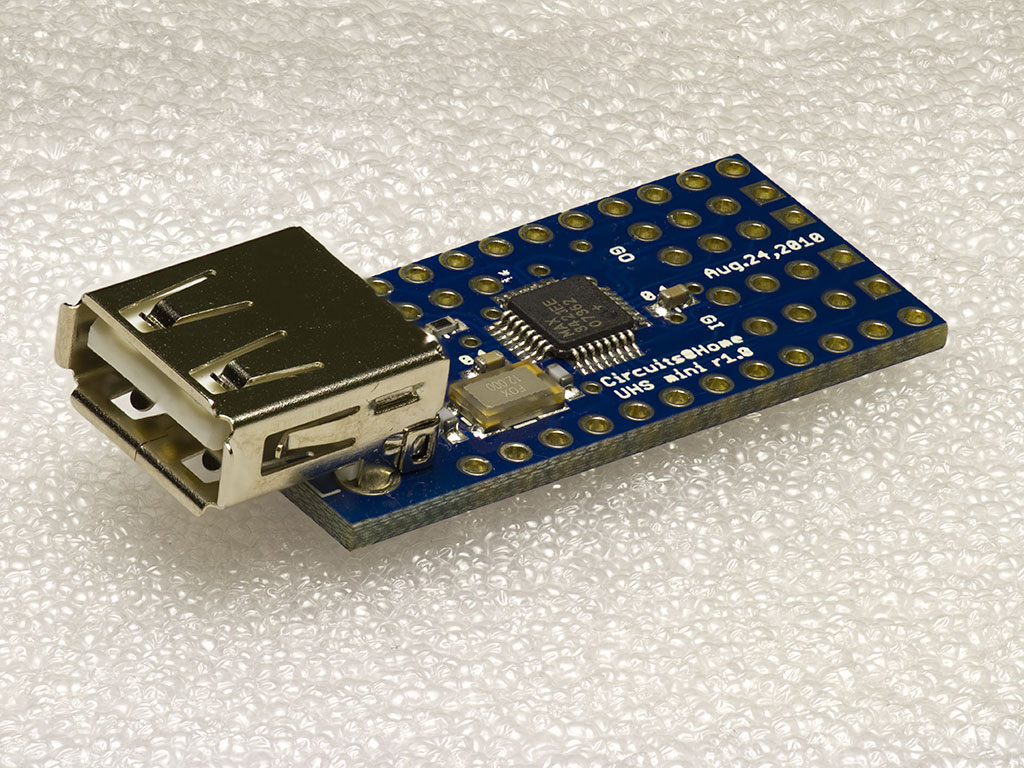
After some great success with the USB Host shield development and the sales of the USB Host shield for Arduino thru our webshop, we are happy to announce that we have also started carrying the compact version of the shield, the USB Host Shield for Arduino Pro Mini.
USB Host Shield for Arduino Pro Mini
The shield is just a compact version of the well known USB Host shield for Arduino’s and it makes you able to add the USB Host functionality such as Bluetooth control with PS3, Wii or your Android phone, to any Arduino Pro Mini equipped projects. Please note that your Arduino Pro Mini must be running 3.3V though!
We will be selling the mini shield at an introductory price of $20.00 USD and it can be bought including pre-cut headers for stacking.
I am very pleased to announce that I have now added support for the PS4 controller via Bluetooth. This will allow you to read all the buttons and joysticks with the same API as all the other libraries I have written for the USB Host library.
To get started you should look at the provided example. It shows how to read the different buttons and joysticks. I still haven’t figured out how to control the light, rumble and read the accelerometer, gyroscope and touchpad, but hopefully I will figure that out soon. Read more…
I am glad to announce that Bluetooth HID devices are now supported by the USB Host library. The library already supports PS3 and Wiimote controllers, but now it also supports more general devices, like Bluetooth keyboard and mice.
First time you run the code, you will have to pair with your device, this is done by creating the instance like so:
BTHID bthid(&Btd, PAIR, "0000");
You can of course set the pin to anything you like.
Now you should enable discovery of your device and it should automatically detect any mouse or keyboard present and then connect to them. On Bluetooth mice there is no need to enter any pin, but on a keyboard you should enter the pin on the keyboard and then afterwards press enter.
So in this example you should press 0 four times on the keyboard and then press enter afterwards.
After you have paired with the device, you can simply create the instance like so:
BTHID bthid(&Btd);
When you press any button on your device it will automatically connect to the last paired device i.e. your Arduino. Read more…
We are very pleased to announce that our Kickstarter for the Balanduino balancing robot has successfully been funded by $13,494 which we are very happy about.
We have just received stickers from our printing company and have decided to give a little bonus in form of a signed Balanduino post card. We will be shipping this post card and stickers to all of our backers who have pledged $10 or more, within next week.
Hello to all of our followers. This is just a short reminder that the Kickstarter of our Balancing robot, the Balanduino, is nearly finished.
We have already reached our goal of $10.000, but of course it would be great to get even more backers and pledges.
In the meanwhile we have recorded a new video of the robot with a GoPro mounted on the top.
Hello all fellow blog readers.
Most of you might be aware of the Balancing robot project we have been working on for quite a while, if not please have a look here: The Balancing Robot.
We have now been working on this project in over a year, fine tuning the balance and stability of the robot and adding even other features and control options.
And NOW we are ready to announce this Balancing robot to be sold as a kit, named Balanduino.
The Balanduino
The Balanduino kit consists of an Arduino compatible main board with the necessary sensors to keep the robot balanced automatically.
Furthermore the main board contains a USB Host controller, the MAX3421E, which library for the Arduino we have been expanding a lot recently, adding support for many of the most popular game controllers.
This USB Host controller together with a USB Bluetooth dongle enabled you to remotely control the Balanduino with your Android phone, PS3, Wii or Xbox controller and even your Windows, Linux or Mac PC. Read more…
I’m happy to announce that documentation is now available for all the libraries I have written for the USB Host Shield library.
The documentation is available at the following link: http://felis.github.com/USB_Host_Shield_2.0.
The documentation is generated using Doxygen which is a free documentation-generator based upon the header files in the source code.
For instance the following comment will end up looking like this in the documentation:
I hope this will be useful for people who is new to the USB host library or even people who just want a quick overview.
If you spot any typos or got any comments please let me know in the comments below.
This is a short announcement regarding the USB Host Shield from Circuits@Home, which we are now carrying in in our store.
By buying the official shield you will support the continous development of the library and get support from us!
The shield can be found and bought here: USB Host Shield 2.0 for Arduino.
The shield can be used with almost any kind of Arduino including the most popular Arduino Uno, Arduino Mega, Arduino Leonardo etc. If you are in doubt if your Arduino is supported please don’t hesitate to write a comment below.




Recent Comments