I have previous thought about buying a universal remote like this one, as I was tired of grabbing my JVC remote for my stereo everytime I had to turn it on, off or turn the volume up or down. But then I discovered Ken Shirriff’s IR Library for the Arduino. Normally the library didn’t support neither the Panasonic or JVC protocol, but I discovered that somebody else had already added them. See the forked github library. At first I simple downloaded the library and tested whenever it could decode the Panasonic protocol and send commands to my JVC stereo. It had to tweak the library a bit, but then it worked just fine.
I thought it would be a bit overkill to use an Arduino and I didn’t want to rewrite the whole library, so I decided to use another AVR’s but in a much smaller package, the ATtiny85. Which is 8-pin AVR. Read more…
Hello everybody
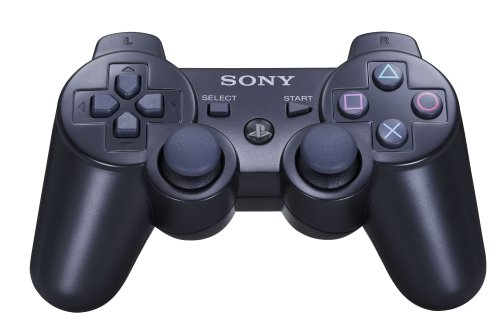
I have for a long time wanted to build a remote controllable balancing robot aka Segway – that’s was actually the main reason why I created the PS3 Bluetooth Library both for Arduino and the FEZ Devices. It has been a long time since the sneak peak and the performance has been improved a lot since then. The original one had a FEZ Rhino as the main processor, but I discovered that it was not fast enough to read the encoders, as it is not running embedded code. Also I was already using more than 10ms per loop, which I used as a fixed time loop, so I decided to step up a notch and go for a much more powerful device: the mbed microcontroller, which is an ARM Cortex-M3 running 96MHz.
It might have been possible with just a normal Arduino (NB: I have now ported the code to Arduino, see update for the code), but I didn’t want the speed of the processor to be an issue, so I decided to go for the mbed. The robot also features an Arduino Duemilanove with a USB Host Shield on top running a sketch based on my PS3 Bluetooth Library. The mbed board actually has USB Host functionality, but I decided not to port the PS3 Bluetooth Library as my original thought were to use an Arduino Due, but as you might know it hasn’t been released yet, despite the Arduino team announced, that it would be released by the end of 2011. But as soon as it is released I think I will port the code to it instead.
Video Demonstration
Here is a short video demonstration of the robot and me explaining some of the concepts of the design and how it works:
[youtube=http://www.youtube.com/watch?v=N28C_JqVhGU] Read more…
Update
I have now created another library that only supports the controller via USB. The source code for the USB library can be found at the github repository. An example can be found as well: PS3USB.ino.
NB: The newest source code can now be found at github.
Playstation Navigation and Motion controller
As some of you might have seen, my class for the development boards from www.ghielectronics.com, including FEZ Panda, FEZ domino, FEZ Rhino etc, now also works with the two other PS3 controller: the Navigation and the Motion controller. The Navigation controller works the exact same way as the original Dualshock 3 controller.
The Motion controller is a little different, as all of the commands sent to the controller are sent via the HID Interrupt channel, and not thru the HID Control channel as the Dualshock 3 and Navigation controller. It also use a DATA output request instead of a set output report request. For more information, see the source code and the wiki.
A great thing about the Motion controller is that it features a 3-axis accelerometer, 3-axis gyro, 3-axis magnetomer, a thermometer, and the shiny bulb on the top of course. All these peripherals can by controlled by the FEZ devices too.
Stay tuned as I have almost finished porting the code to Arduino – I will make a new post as soon as I’m finished.
Here is a short sneak peak of a project we are working on.
When the project is finished we are going to write a guide about it, publish the code and of course make a longer video explaining the different parts and showing the Segway in action!
I can briefly say that we are using 2x 12V motors + Motorcontroller from Pololu, a 6DOF board from Sparkfun, a FEZ Rhino and a 12V battery pack.
The data from the 6DOF board is run thru a Kalman filter, whose data is used in a PID filter to regulate the motors. More details and source code will come soon!
NB: The newest source code can now be found at github.
As you might have seen, I finally got the PS3 Controller working via Bluetooth. Before you read any further, you should read my previous post first and also see the wiki for more information. Read more…
NB: The newest source code can now be found at github.
As Thomas origanally posted, the FEZ Panda can actually be used as a USB-Host: Fez Panda And USB Host. I have for long time wanted to use my PS3 DualShock 3 controllers for something useful (besides playing Playstation of course), therefore I thought it would be interesting to connect it to the FEZ Panda.
I recently bought the “Graphic LCD Serial Backpack” from Sparkfun. When reading the comments for the product. I discovered that a user named “SummoningDark”, had made a new improved firmware. A lot of people asked Sparkfun to change the official firmware with the new one, so i decided to check it out. The problem were that I do not own a programmer, so at first I thought that I had to buy one. But after some googling I found out that the Arduino could actually be used as an In System Programmer (ISP).
After a lot of work I finally got it working and it has really improved the perfomance of the screen. The speed is much higher (SummoningDark says 10 times) and there are no more bugs (with the old firmware the screen would suddenly write the text or a line a odd place).
I will now try to explain as best as I can, how to upload the new firmware.
NB: You can also use this guide if you need a different bootloader or another hex file on any AVR. This is just meant as an example. Read more…
I recently made a NXT motor shield for my arduino. It can control two NXT motors and also read the onboard encoders. In true Arduino spirit I decided to share it with the rest of the community. But first i will talk about how everything works, and then show the finished shield including a short video demonstration. Read more…



Recent Comments