At 4th semester of my bachelor at Aalborg University me and my project partner became a part of a new research project, UAWorld (DRONER RYKKER INDENDØRS MED DANSK TEKNOLOGI). A project aiming for developing a new infrastructure and a set of drones capable of being used in indoor industrial environments with dynamically changing obstacles (and layout) and human beings likely to walk around. The drones within the project is intended to carry assembly line goods around an assembly line hall into a warehouse where it will be autonomously offloaded.
UAWorld usecase
The main research group within the project had already taken several decisions regarding the drone typology, which indoor positioning system to use and which wireless communication to use. But being dependent on these systems (positioning and wireless link) to reliably navigate a mission critical environment, making sure that the drone would never drop the goods or crash into human beings even at emergency situations, is just as an important task as making the quadcopter navigate safely.
For download links to the report and source code, please scroll to the bottom of the post. Further videos of the project undergoing development can also be found in the bottom of the post. Read more…
FPGA’s can be very advanced to get started using, especially if you are used to microcontrollers.
But when you first get the right feeling and the proper mindset you will soon see the endless possibilities with the programmable logic.
One of the great aspects of the logic is the speed and the full control of what happens at every single clock cycle.
With this full control it doesn’t takes many lines of code to generate a very time-critical signal such as a video signal.
In this short post I will walk thru our current test setup with an FPGA, the Spartan 3E, controlling a 18-bit 7″ 800×480 TFT display.
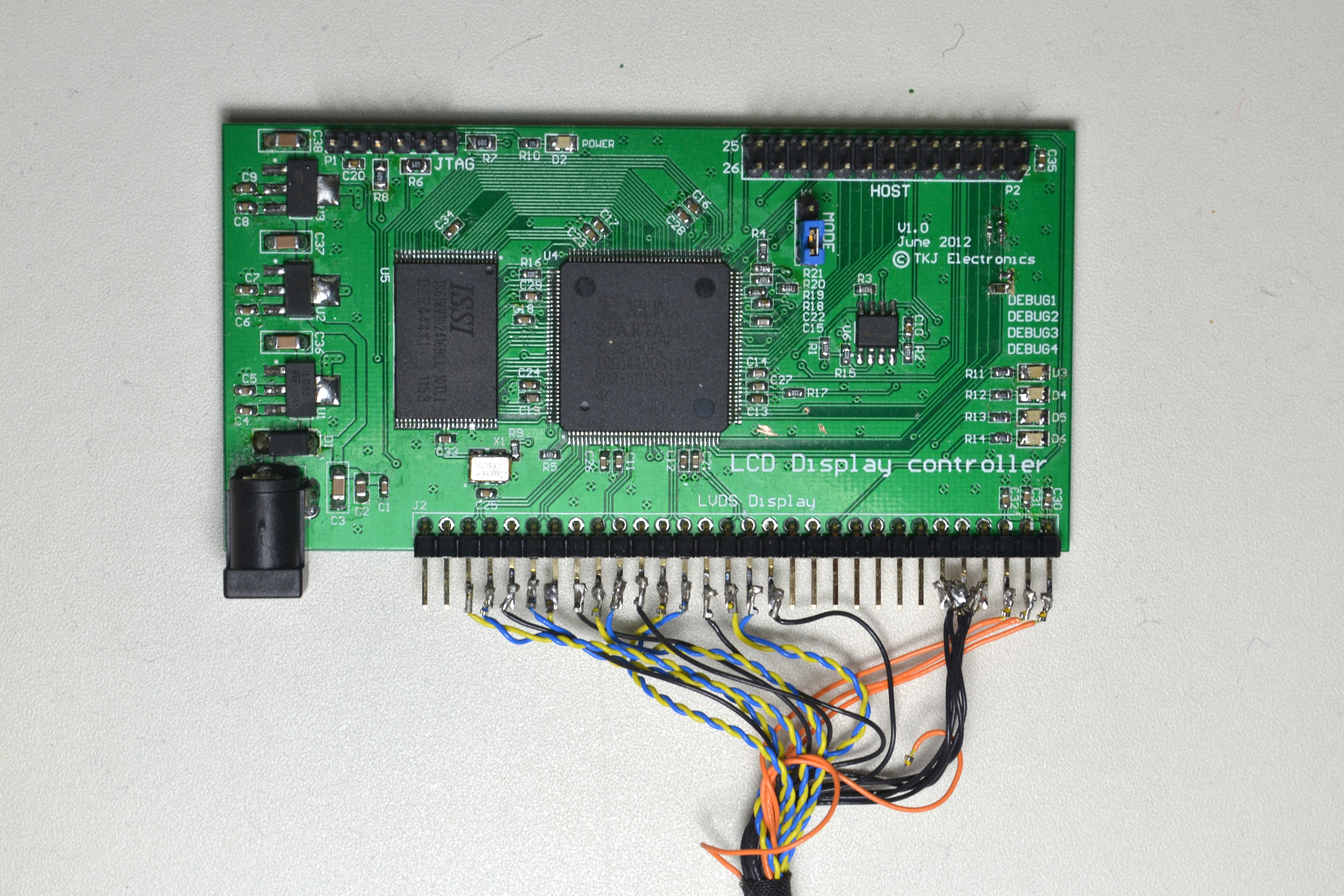
We have had a couple of embedded projects for our customers where the requirement were large-screen LVDS displays. By large screen I mean sizes over 7″ and a resolution of 800×480 where the common SSD1963 LCD controller can’t be used as the frame buffer RAM is too small.
LVDS Display Controller V1.0
So now we have decided to make our own similar display controller board but for LVDS displays as they are much more inexpensive and common (used in TVs and PCs). Read more…
I posted this video guide on Youtube a couple of days ago, though I wanted to announce it in here too.
In this video tutorial I guide you thru how to make a counter application for the Basys2 board, which is an FPGA board from Digilent to those who are unfamiliar with it.
I will show you the required steps of setting up a project in Xilinx ISE, writing the VHDL code for the counter application, writing the pin constraints file (.UCF) and finally generating the bit-file for the Basys2 board.
This video tutorial was actually requested by a reader of the blog, so with this being my first video tutorial, I would like to show you that comments and requests ARE HEARD! 🙂
EDIT:
The Xilinx ISE project files for the tutorial can be downloaded here: Basys2_CounterApp.zip
I posted this video on Youtube long time ago, but I forgot to write about it on my blog.
In the video I demonstrate how the Basys2 board, with a Spartan-3E 100K, can be used to generate a VGA signal.
I also show my bouncing ball application.
You can download the Xilinx project files here, including the VHDL files and User Constraint File for the Basys2 board.
The LatticeMico32 is an open source soft core processor provided by Lattice. The Lattice system makes a complete set of Verilog files, which can be ported to any FPGA. I decided to port it to the Xilinx series.
The example in the guide just blinks some LEDs, but it is not just LED blinking made with Verilog or VHDL coding, it’s made with C-coding inside an Eclipse enviroment, then compiled to the LatticeMico32. In the video above I show my first example and experience with the LM32 on the Spartan 6 FPGA.
Xilinx Spartan 6 XC6SLX9 to XC6SLX25 FPGA (I’ve got the XC6SLX25)
64 MByte DDR SDRAM
MicroSD socket
128 Kbit EEPROM memory
48MHz Clock for the FPGA (going out from the Cypress)
Spartan 6 module content
The first impression of the board is a nice design, it looks good and it feels good. The second great thing about the board, is that almost every pin on the FPGA has been brought out, and even also some of the Cypress microcontroller pins. It is also possible to customize the Cypress microcontroller firmware. There are also some connections between the FPGA and the Cypress microcontroller, which makes it possible to develop applications that uses both the FPGA and the Cypress microcontroller.
As the Cypress microntroller has a USB capability, it is also used to upload designs to the FPGA, but it can also be used in your own applications.
When I first got the board it was kind of difficult getting started. Though the ZTEX website contains a lot of documents, schematics and layout, and they have a nice Wiki, I kind of missed an easy “Getting Started” guide.
But after reading the Wiki a couple of times, I downloaded their Firmware/SDK package and got their FWLoader running. The FWLoader is a Java application used to communicate with the Onboard Cypress microcontroller over USB.
To communicate with the Cypress microcontroller, you can use their FWLoader, found in their ZTEX EZ-USB SDK. To begin with, you have to upload the firmware for the Cypress microcontroller, which takes care of programming the FPGA. To do so, you have to copy “standalone.ihx” to the java folder (inside the SDK), and then afterwards execute the following command.
After executing this command, it was now possible to communicate with the Cypress microcontroller using the commands explained on their FWLoader Wiki page. I was able to upload my first bitfile to the FPGA using the following command.
java -cp FWLoader.jar FWLoader -uf <bit-fil>
In the video above you can see my first experience with the board, getting a couple of LEDs to blink. I’ve used the 48MHz Clock, prescaled it, and made a simple counter – it worked 🙂
So in total, it wasn’t that difficult to get it running. The things that was difficult, was figuring out how their FWLoader worked, and how I should upload new designs. Though their Wiki was a great help!
As the Spartan 6 has a lot of power, I am sure that this will be a well-used board, and I can already imagine getting the LatticeMico32, a 32-bit open soft core processor, to work on this.
We have been working a while with a FPGA STAMP board, to make it easier for you to start using and develop with FPGAs. Finally we have a working prototype, which you can see on the following images.
The FPGA STAMP Board includes
Spartan 3E FPGA – XC3S500E
4Mbit Xilinx Flash PROM for configuration storage
Voltage regulators and protection, as 3.3V has to be added externally
TKJ Electronics - FPGA STAMP Board
TKJ Electronics - FPGA STAMP Board
TKJ Electronics - FPGA STAMP Board
The estimated price is around $80/each
If you would like to buy one of theese boards, please Contact Us
When I first recieved the board, I had already found out how to use Xilinx ISE to make schematic projects. So I made a 8-bit counter using flip-flops, AND and OR gates.
You can see the schematic here beneath:
Xilinx ISE - 8-bit Flip-Flop Counter Schematic
After a long chat with guy from HIH named Thomas (3rd semester), I got a pretty good understanding of the VHDL language and how to write to the FPGA.
So together with him I made my first project – a seven segment display decoder. It takes two 4-bit binary inputs and turns it into two HEX decimals on the seven segment display.
Afterwards I continued the project, and made a counter using the same seven segment decoder “module”. Note: A module is like any other module in regular programming language; it works by importing it, and then using it’s “functions” – though you don’t have functions with FPGA’s, but instead you have entities with processes!
Finally I made a fully working 24-hour clock with hours, minutes and seconds. You are able to set the clock by using the switches and buttons.
I’ve uploaded a video to youtube about these projects so you can see what I’ve made.
Beneath the video I’ve also uploaded the VHDL code for the 3 projects, and the seven segment module, and the UCF (pin definition) files for use with the Basys2 board, for the different projects.
I’ve uploaded a zip file containing the VHDL code for the 3 Seven segment projects and UCF files for use with the Basys2 board. You can grab the zip file here!
Today I recieved my Digilent Basys2 FPGA board which has a Spartan-3E 100K BGA chip (XC3S100E CP132) on top.
BASYS2 Board
The Basys2 board is a simple FPGA development board, and it is easy to start with, as it has an onboard USB programmer. It has also got a 2Mbit flash for FPGA configuration storage.
The great thing with development boards though, is that you have some kind of periphirals, and on this board you have 8 switches, 8 LED’s, 4 buttons, a switchable clock (25/50/100MHz), VGA output and 4 expansion ports. This makes it alot easier to get started, because you only have to focus on the software/programming part – not the hardware.
I’ve uploaded a short video to show you the board, and the demo program which comes pre-programmed with the board!




Recent Comments