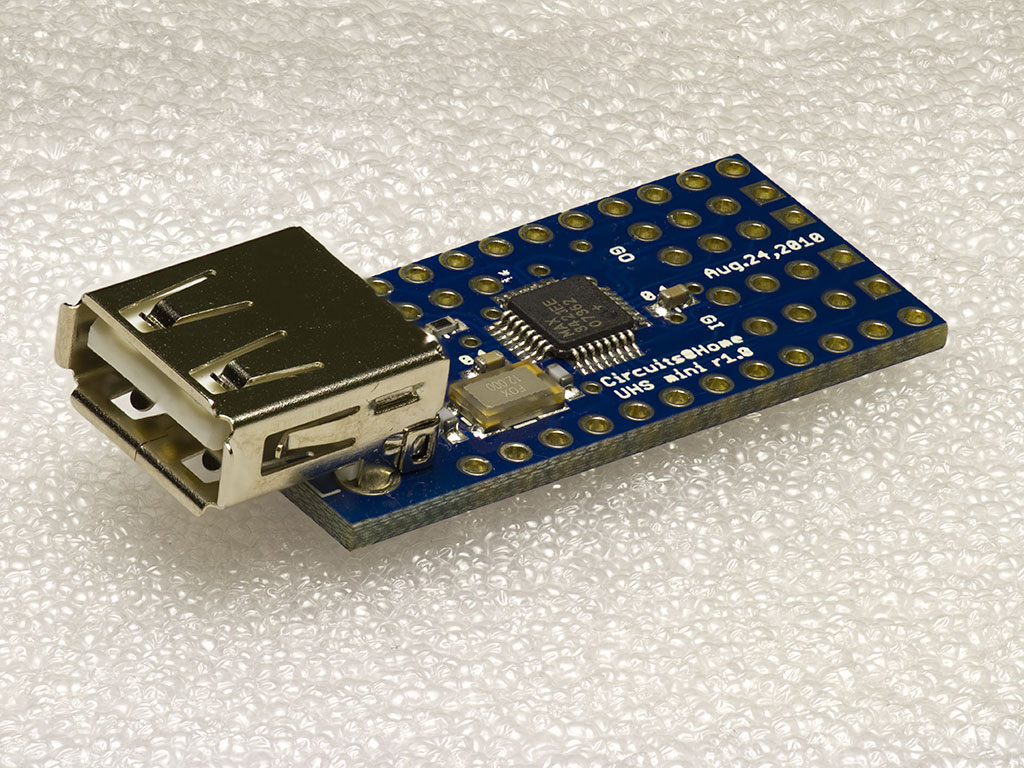
After some great success with the USB Host shield development and the sales of the USB Host shield for Arduino thru our webshop, we are happy to announce that we have also started carrying the compact version of the shield, the USB Host Shield for Arduino Pro Mini.
USB Host Shield for Arduino Pro Mini
The shield is just a compact version of the well known USB Host shield for Arduino’s and it makes you able to add the USB Host functionality such as Bluetooth control with PS3, Wii or your Android phone, to any Arduino Pro Mini equipped projects. Please note that your Arduino Pro Mini must be running 3.3V though!
We will be selling the mini shield at an introductory price of $20.00 USD and it can be bought including pre-cut headers for stacking.
I am very pleased to announce that I have now added support for the PS4 controller via Bluetooth. This will allow you to read all the buttons and joysticks with the same API as all the other libraries I have written for the USB Host library.
To get started you should look at the provided example. It shows how to read the different buttons and joysticks. I still haven’t figured out how to control the light, rumble and read the accelerometer, gyroscope and touchpad, but hopefully I will figure that out soon. Read more…
I am glad to announce that Bluetooth HID devices are now supported by the USB Host library. The library already supports PS3 and Wiimote controllers, but now it also supports more general devices, like Bluetooth keyboard and mice.
First time you run the code, you will have to pair with your device, this is done by creating the instance like so:
BTHID bthid(&Btd, PAIR, "0000");
You can of course set the pin to anything you like.
Now you should enable discovery of your device and it should automatically detect any mouse or keyboard present and then connect to them. On Bluetooth mice there is no need to enter any pin, but on a keyboard you should enter the pin on the keyboard and then afterwards press enter.
So in this example you should press 0 four times on the keyboard and then press enter afterwards.
After you have paired with the device, you can simply create the instance like so:
BTHID bthid(&Btd);
When you press any button on your device it will automatically connect to the last paired device i.e. your Arduino. Read more…
We are very pleased to announce that our Kickstarter for the Balanduino balancing robot has successfully been funded by $13,494 which we are very happy about.
We have just received stickers from our printing company and have decided to give a little bonus in form of a signed Balanduino post card. We will be shipping this post card and stickers to all of our backers who have pledged $10 or more, within next week.
Hello to all of our followers. This is just a short reminder that the Kickstarter of our Balancing robot, the Balanduino, is nearly finished.
We have already reached our goal of $10.000, but of course it would be great to get even more backers and pledges.
In the meanwhile we have recorded a new video of the robot with a GoPro mounted on the top.
I’m happy to announce that documentation is now available for all the libraries I have written for the USB Host Shield library.
The documentation is available at the following link: http://felis.github.com/USB_Host_Shield_2.0.
The documentation is generated using Doxygen which is a free documentation-generator based upon the header files in the source code.
For instance the following comment will end up looking like this in the documentation:
I hope this will be useful for people who is new to the USB host library or even people who just want a quick overview.
If you spot any typos or got any comments please let me know in the comments below.
This is a short announcement regarding the USB Host Shield from Circuits@Home, which we are now carrying in in our store.
By buying the official shield you will support the continous development of the library and get support from us!
The shield can be found and bought here: USB Host Shield 2.0 for Arduino.
The shield can be used with almost any kind of Arduino including the most popular Arduino Uno, Arduino Mega, Arduino Leonardo etc. If you are in doubt if your Arduino is supported please don’t hesitate to write a comment below.
You asked for it and here it is.
I finally got the time to implement support for Wireless Xbox 360 controllers to the USB Host Library. This is done via a Xbox 360 Wireless receiver that is normally intended for Windows computers.
The receiver supports up to four controllers internally, so it was fairly easy to implement it.
Actually I havn’t tested the library with more than one controller, but if somebody out there could confirm if it’s working or not, with more than one controller, I would really appreciate it!
Thanks to Tim, multiple controllers is now confirmed to work! Read more…
Update:
The library now also supports the Nunchuck controller and the Motion Plus extensions. The newest version of the library can be found at github.
Another Update:
The library now also work with the new Wiimote where the Motion Plus extension is built-in. Check out my commit to see what where needed in order to make the new Wiimote work as well – the main difference is that you now have to send the data using the interrupt channel.
To tell if your Wiimote is the new type, it should have a label at the bottom saying “Wii MotionPlus INSIDE”. If you are in doubt take a look at this picture.
Yet another update:
The IR camera inside the Wiimote is now also supported. The the following commit for more information.
A new update once again:
The Wii U Pro Controller is now also supported via Bluetooth.
This is yet again a new library for Arduino.
But this time it is a speciel one and a library I have though about making for a long time since I wrote the PS3 Bluetooth Library. It is the RFCOMM/SPP library, in short it is a virtual serial port via Bluetooth, which means you can now communicate with your Arduino via Bluetooth using a normal terminal application on your computer, smartphone etc. It has been confirmed working with Windows 7, Mac OS X, Linux (Ubuntu 12.04) and several Android devices.


Recent Comments